
Looking for an easy and effective way to reach more customers and grow your business? Google My Business (GMB) could be the solution you’re looking for! In this article, we’ll discuss the key benefits of GMB, how it can help you reach more customers, and how you can unlock its potential to help your business succeed.
Transform your online presence and drive more conversions with our expert digital marketing services.
Introduction to Google My Business
As a small business owner, you may seek ways to reach more customers and grow your business. One way to do this is by creating a listing on Google My Business (GMB). GMB is a free service that allows businesses to create a listing that appears in search results when people search for related keywords.
Creating a GMB listing is simple and only takes a few minutes. Once your listing is created, you can add photos, business hours, contact information, and other details to help potential customers learn more about your business. You can also use GMB to post updates and special offers, encouraging people to visit your business.
If you still need to use GMB, now is the time to start! Unlock the potential of GMB by creating a listing for your small business today.
Benefits of Using Google My Business
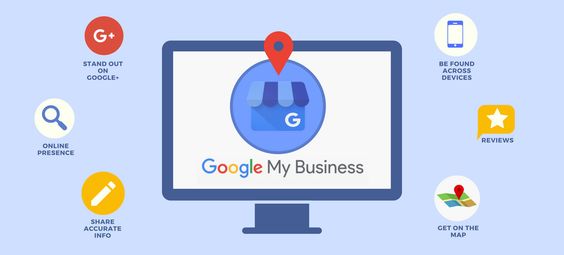
Businesses and organizations can manage their online presence across Google, including Search and Maps, with Google My Business, a free tool. Verifying and editing your business information can help customers find you, contact you, and learn more about your business.
It’s essential to keep your business information up to date so customers can easily find you and get in touch. You can edit your business name, address, phone number, website, hours, description, products, services, photos, and other details.
Customers often use Google to search for local businesses, so it’s essential to ensure your business information is accurate and up-to-date. Managing your business information on Google My Business can help potential customers find your business when they do a local search on Google Search or Maps.
How To Get Started With Google My Business
If you still need to do so, the first step is to create a Google My Business account. You can do this by going to google.com/business. Once you’re signed in, click “Add your business” and follow the instructions.
Include accurate and up-to-date information about your business, such as your hours of operation, contact information, and location. You can also add photos and videos, giving potential customers a better idea of what your business has to offer.
Once your account is created and verified, you’ll be able to start taking advantage of all the features Google My Business has to offer. For example, you can use the platform to post updates about your business, respond to customer reviews, and track your performance over time.
Setting Up Your Google My Business Profile
Assuming you already have a Google account, setting up your GMB profile is relatively straightforward. Here’s a step-by-step guide:
1) Go to google.com/business and sign in with your Google account. If you don’t have a Google account, you can create one here.
2) Enter your business name and address. You can also add a service area if you deliver goods or services to customers at their locations.
3) Choose your business category from the list provided. If your business category isn’t listed, select the option that best describes it.
4) Add a phone number and website URL for your business. You can also add other information, such as opening hours and photos.
5) Verify your listing by phone or postcard. Once you’ve verified your listing, it will appear on Google Maps and Search when customers search for your business name or related keywords.
Best Practices for Managing Your Google My Business Listing
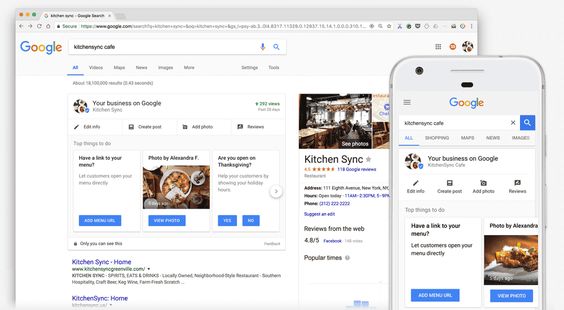
Assuming you’ve already claimed your GMB listing, here are a few best practices for managing it:
- Keep your business information up-to-date and accurate
Make sure to regularly check and update your business name, address, phone number, hours of operation, website, and categories. Any discrepancies between your GMB listing and other online directories can hurt your ranking in search results. - Use high-quality photos
Google My Business allows you to upload up to 10 photos of your business. Make sure to take advantage of this by uploading high-quality images representing your business. Avoid using stock photos or pictures with text overlays. - Respond to reviews (both positive and negative)
GMB provides an easy way for customers to leave their thoughts about their experience with your business. Responding to positive and negative reviews shows that you value customer feedback and are willing to improve the customer experience. - Encourage customers to leave reviews
Make it easy for customers to leave reviews by adding a link to your GMB listing on your website and promoting it on social media and email marketing campaigns.
Tips for Optimizing Your Listings for SEO and Organic Visibility
You can do a few key things to optimize your listings for SEO and organic visibility.
- Make sure your business name, address, and phone number (NAP) are consistent across all online and offline platforms. This will help search engines verify your business and list it accordingly.
- Use relevant keywords in your listing title and description to help potential customers find your business more efficiently.
- Add images and videos to your listing to make it more visually appealing and informative.
- Keep your business hours up-to-date so customers know when they can reach you.
- Encourage customers to leave reviews on your listing, as positive reviews can impact your ranking in search results.
Leveraging Ads & Other Paid Strategies to Reach More Customers
As a business owner, you’re always looking for ways to reach more customers and grow your business. Google My Business can help you do just that. By creating a free listing on Google, you can increase your visibility and reach potential customers searching for businesses like yours.
In addition to creating a free listing, you can also use Google My Business to create and post ads. Ads allow you to target potential customers based on their location, interests, and other factors. You can also use Google My Business to boost your SEO efforts and make it easier for potential customers to find your website when they search for keywords related to your business.

Paid strategies like ads and SEO can effectively reach more customers and grow your business. However, there are other ways to do it. You can also use Google My Business to create free listings and post content that will help you attract organic traffic from potential customers who are already interested in your offer.
Measuring the Impact of your Google My Business Presence
Google My Business is a powerful tool that can help businesses of all sizes reach more customers and grow their business. The first step in unlocking the potential of Google My Business is understanding how it works and what impact it can have on your business.
Google My Business is a free listing that allows businesses to control their information and appear in search results on Google.com, Google Maps, and Google+. Claimed listings also get added features, like the ability to respond to reviews and see insights about how customers find you online.
There are many benefits of having a presence on Google My Business, but some of the most impactful include the following:
Increased Visibility: When customers search for businesses like yours on Google, your listing can appear at the top of the search results, making it more likely for them to click through to your website or visit your store.
More Customers: A strong presence on Google My Business can lead to more customers visiting your store or website. Consumers are twice as likely to consider businesses reputable if their listings are complete and accurate.
Improved Customer Engagement: With features like messaging and location extensions, you can make it easy for customers to get in touch with you or find your business when they’re nearby. You can also use GMB Insights to understand better how customers interact with your listing and make changes accordingly.
If you want to measure the impact of your GMB listing
Conclusion
Google My Business is a potent tool for businesses of all sizes. It can help you get your business seen, reach more customers, and grow your presence online. The right approach can also be a great way to engage with customers and build relationships. We hope this article has given you a better understanding of how Google My Business works and that you feel confident in setting up your account and unlocking its potential for your business!